Videoleap: AI Video Editor
- 4.5
- Rating
- 10.00M
- Installs
- Free
- Price

 Analysis by App-foxy
I opened Videoleap: AI Video Editor expecting a quick way to turn ordinary phone clips into something ready for social media, and that is where it makes the most sense. Developed by Lightricks Ltd., this free video editing app combines familiar timeline editing with effects, templates, creative tools, and AI-assisted options. It is aimed at people who want more control than a basic phone editor gives them without immediately moving to a desktop program.
My first impression was that it sits between a simple reel maker and a more serious mobile editor. You can make a short video quickly, but the interface also gives you room to adjust timing, layers, transitions, text, sound, and visual treatment. That flexibility is useful, although it means the app can feel busy when you are seeing it for the first time.
It is available at no upfront cost, with optional purchases ranging from $3.99 to $299.99 per item. That difference matters: the free experience is enough to learn the workflow and produce useful edits, but some of the more advanced creative options may lead you toward paid choices. I would treat the free version as a practical trial rather than assuming every visible tool is included without restrictions.
You May Also Like

 Blood Strike: 2.5 Anniversary
Blood Strike’s Loadouts Turn Every Drop Into a Tactical Gamble
A close look at Blood Strike’s custom loadouts: how fast access to signature weapons reshapes its battle royale rhythm, rewards preparation, and narrows the gap between fights.

 Pandora - Music & Podcasts
Pandora’s Music Is Easy to Start, but Harder to Recover
Pandora’s strength is its low-effort path from a seed to a station. Its weak spot is how much confidence it asks you to place in connection, setup, and quiet recovery.

 8 Ball Pool
 Is Built on Rivalries, Rematches, and Routine
A close look at the rivalries, rematches, shared routines, and unanswered safety questions that turn a quick pool match into a persistent mobile community.

 Samsung Music
’s Quiet Strength Is Playing What You Already Own
Its reach comes less from spectacle than from dependable access to a personal library. That simplicity is both the app’s strongest retention engine and its ceiling.

 AccuWeather: Weather Radar
AccuWeather Review: A Quick, Clear Forecast for Everyday Decisions
For everyday plans, the best forecast is the one you can understand quickly. AccuWeather makes rain timing, radar, and local conditions easy to act on, with a few trade-offs.

 Hill Climb Racing
Why Hill Climb Racing Still Turns Crashes Into One More Run
A tiny car, a bumpy hill and one more upgrade: Hill Climb Racing keeps resurfacing because its simple chaos makes every near-miss feel personal.
More From Our News Desk



What to expect before making your first video
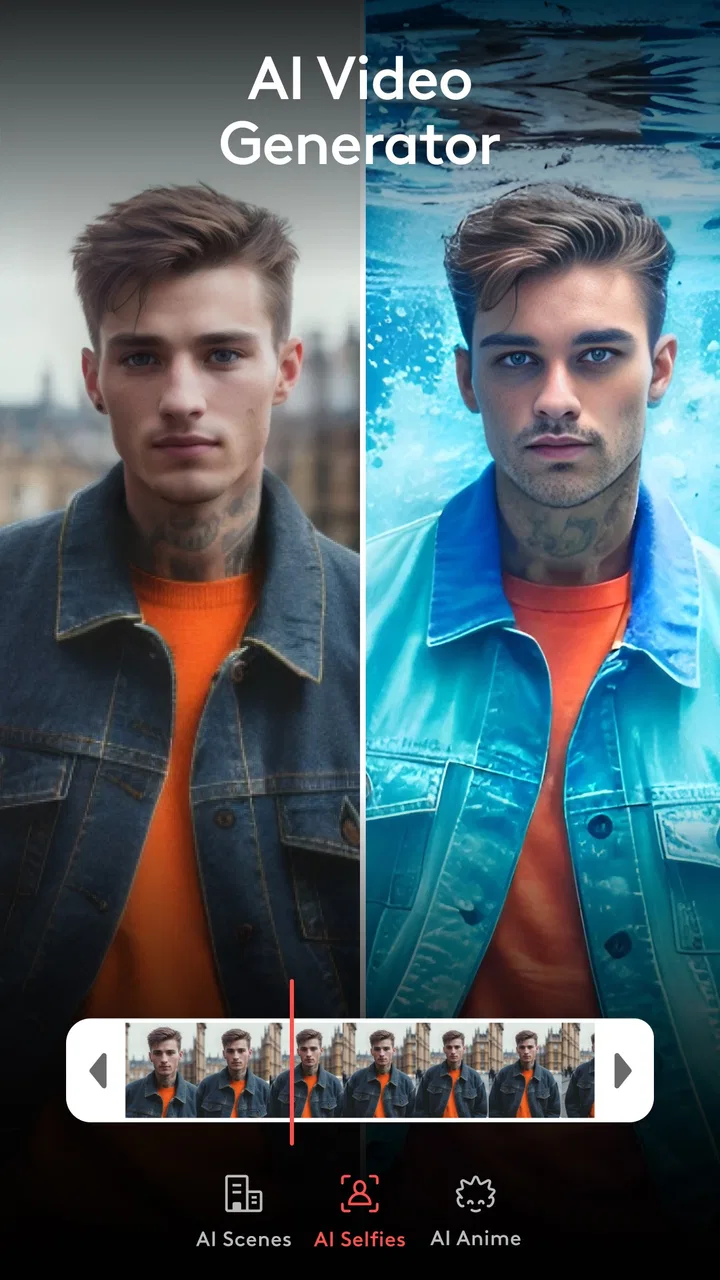
Videoleap belongs to the video players and editors category, but its personality is much more creative than a basic trimming utility. The app is built for short-form videos, personal projects, travel clips, visual experiments, and polished posts assembled directly on a phone. Its store summary focuses on AI video generation, reel creation, movie making, and improving video quality with AI, so the broad promise is clear: it wants to help you move from raw footage to a finished-looking result without requiring specialist editing knowledge.
In practice, I found it most comfortable for projects where the visual idea is more important than a perfectly organized production workflow. A birthday montage, a quick product demonstration, a before-and-after clip, or a short travel recap all fit naturally. You can begin with one clip and build around it, or combine several pieces when the story needs a beginning, middle, and ending.
The app has a strong emphasis on experimentation. Effects and adjustments invite you to try a look, compare it with the original, and decide whether it improves the scene. That is enjoyable when you already have a clear mood in mind. It is less helpful when you open the editor without a plan and start adding effects simply because they are available.
Its popularity also gives some context. Videoleap has an average rating of 4.5 from around 198 thousand ratings and more than 10 million installs. Those figures suggest that it has reached a broad mobile audience, but they should not be read as a guarantee that every workflow will suit you. A beginner making a fifteen-second social clip and an experienced editor managing a long, multi-part project will have very different expectations.
The content rating is Teen, which is worth keeping in mind if the app is being considered for a younger user. The current version is 1.39.1, and it supports devices running Android 8.0 or later. On a compatible phone, I would still leave some free storage available before starting a larger project, because video editing is more comfortable when the device is not already struggling with space.
Who will get the most from it
I would recommend it to someone who wants a noticeable improvement over the editor built into a phone but does not want to learn a desktop application. It is especially useful if you enjoy making reels, short visual stories, stylized clips, or edits where timing and atmosphere matter as much as simple cutting.
It is also a good fit for a creator who likes to work visually. You can make decisions by watching the result rather than dealing with complicated technical settings from the beginning. That makes the first session less intimidating than opening a professional desktop editor filled with panels and unfamiliar controls.
I would be more cautious about recommending it to someone who mainly needs precise, efficient batch editing. If your goal is to trim dozens of clips, rename them, organize them, and export them with minimal decoration, a simpler utility may be faster. Likewise, if you need a highly structured long-form project with detailed audio mixing and extensive file management, a desktop editor will usually provide a calmer environment.
Getting set up without feeling lost
After installing the app, my advice is to begin with a small project rather than importing an entire camera roll. Choose two or three clips that belong together and decide what the finished video should communicate. This simple preparation prevents the common beginner mistake of collecting footage first and trying to invent a story after the timeline is already crowded.
Before touching effects, watch each clip from beginning to end. Look for the moment that carries the action: the smile, the reveal, the movement, or the change in scenery. A short edit often becomes stronger when you remove the quiet seconds before and after that moment. Videoleap gives you creative tools, but no effect can rescue footage that has not been selected carefully.
The first screen can feel more expansive than expected because the app presents several possible ways to begin. I found it easier to choose one clear starting route, such as a regular project, rather than exploring every creative option immediately. Once the basic timeline makes sense, returning to templates or AI-assisted tools becomes less confusing because you understand what they are helping you produce.
When you import media, keep the intended format in mind. A vertical project is the natural choice for many reels and phone-first posts, while horizontal footage may be better for a family video or a clip meant to be watched on a larger screen. Mixing orientations is possible in many editing situations, but it can create unwanted cropping or empty space. I recommend deciding on the main viewing shape before you spend time polishing the details.
Another useful habit is to keep the original clips untouched. Make your decisions inside the project rather than permanently altering the source files. That way, you can try a bold crop or a dramatic treatment without worrying that you have lost the clean version. This is particularly helpful when experimenting with AI enhancement, because the improved result may look excellent on one shot and unnatural on another.
The quickest route to a meaningful first result
For a first success, I would make a short three-part sequence: an opening image that establishes the subject, a middle clip with the main action, and a closing shot that gives the video a sense of completion. Trim each piece before adding anything decorative. Even a basic sequence can feel intentional when the cuts happen at the right moments.
Next, adjust the pacing. If a shot repeats information that the viewer already understands, shorten it. If the important action happens too quickly, leave enough time for it to register. This is one of the strongest lessons Videoleap can teach a beginner: editing is often more about removing weak moments than adding impressive ones.
Once the timing works, add one visual idea rather than several unrelated ones. You might use a restrained transition between two scenes, a text overlay that explains the location, or a color adjustment that gives the sequence a consistent mood. I strongly recommend saving a version before trying a more dramatic effect. That small step makes experimentation safer and helps you compare the polished edit with the original direction.
For a realistic everyday example, imagine recording a weekend market visit. I would select a wide shot of the entrance, a close-up of the food or craft that caught my attention, and a final clip showing the walk away. I would trim out camera shake at the start of each recording, place the most visually interesting detail near the middle, and use a short caption only where it adds context. The result would feel more personal than a random collection of clips, without requiring a complicated production.
AI tools can be useful after the basic story is working. If you begin with an automatic or highly stylized result, it becomes harder to tell whether the problem is the footage, the pacing, or the effect. My preferred order is simple: select, trim, arrange, review, and only then enhance. That sequence saves time because it keeps creative decisions separate from technical decoration.
Where beginners commonly hesitate
The biggest source of confusion is the difference between seeing a tool and knowing what it will do to the whole project. Some options are designed for a single clip, while others affect the overall look or structure. I learned to select the exact clip before opening an adjustment or effect, then check whether the change applies only there or more broadly. This avoids the unpleasant surprise of changing a scene that was already working.
Another point of friction is the temptation to use every visible control. Videoleap makes creative experimentation easy, but a video can quickly become noisy when it contains multiple transitions, animated text styles, filters, and overlays competing for attention. I use a simple rule: if an effect does not support the subject, the rhythm, or the story, I remove it. The clean version is often the more convincing one.
AI enhancement deserves a careful approach. Improving video quality can help when a clip is slightly soft or lacks impact, but enhancement is not the same as recovering every lost detail. I would test it on a short section first and watch faces, fine textures, and moving edges closely. If those areas begin to look overly processed, a lighter treatment may be better than pushing the strongest available option.
Users also need to understand the difference between free access and optional purchases. Because the app is free to install, it is easy to assume that every creative feature is included. In reality, the presence of in-app purchases means you should check the screen carefully before committing to a tool or export path. I would not start a time-consuming project around a feature until I had confirmed that the result can be completed in the version I intend to use.
The purchase range is wide enough that I would approach subscriptions or larger unlocks slowly. Try the workflow on a small personal project first, decide whether the editing style genuinely fits you, and only then consider paying for continued access. This is especially important for occasional users who may only edit a few videos each month.
Using the editor more intelligently
One non-obvious strength is how useful the app becomes when you treat it as a place for controlled variations rather than one final attempt. I like making a clean version first, duplicating the creative direction mentally, and then testing a stronger color treatment or transition style. Comparing those versions teaches you which changes actually improve the footage.
A second practical insight is to edit for sound even when the video is mainly visual. A cut that looks smooth can feel abrupt if the audio changes at the wrong moment. I review the sequence once with the image as the priority and again while paying attention to the rhythm of the sound. If the project includes spoken words, I keep text overlays away from the area where they compete with the message.
A third trade-off involves templates and personal identity. A template can help you reach a finished result quickly, particularly when you are unsure how to structure a reel. However, relying on the same preset style can make different projects feel alike. I use templates as a starting framework, then change the clip order, wording, or timing so the final video still reflects the event rather than the template.
A fourth useful habit is to leave the opening until the end. Beginners often spend too long perfecting the first second before they know what the complete video is about. Once the middle and ending are settled, creating an opening that promises the right thing becomes much easier. This is a small workflow change, but it prevents a polished introduction from leading into a weak sequence.
How it compares with simpler and more advanced alternatives
Compared with a phone’s standard editor, Videoleap gives me far more room to shape a mood. Basic phone tools are often quicker for trimming, rotating, and making a fast correction, but they usually do not invite the same level of visual experimentation. If I only need to cut the beginning and ending from a clip, I would choose the built-in option. If I want a short video with layers, expressive effects, text, and a deliberate rhythm, this app is more capable.
Compared with lightweight social media editors, Videoleap feels less limited when I want to build a sequence that is not tied to one platform’s posting flow. That independence is useful for saving a finished project for different destinations. The trade-off is that the larger set of controls asks for more attention. A simpler social editor may get a casual post finished faster when speed matters more than customization.
Against desktop software, the advantage is convenience. I can work from the same device that recorded the footage, which is ideal for a spontaneous trip, a quick announcement, or a project made during a commute. The disadvantage is screen size. Fine timing decisions and detailed adjustments are more tiring on a phone, especially when the project contains many layers or several long clips.
I would also avoid choosing Videoleap solely because of the AI label. AI-assisted tools can speed up creative exploration, but they do not replace decisions about framing, pacing, relevance, and taste. The best results still come from a person who knows what the video is trying to say. In my experience, the app is strongest when AI is used as a helper inside a thoughtful edit, not as a substitute for one.
When I would skip it
I would skip it if I wanted an almost automatic result and had no interest in adjusting the output. The app can make creation approachable, but its value increases when you are willing to review the timeline and make choices. Someone who wants one-tap trimming with no creative decisions may find the extra tools unnecessary.
I would also choose another option for a long documentary, a complex multi-camera project, or work that depends on exact audio engineering. Videoleap is impressive as a mobile creative studio, but a larger editor is more comfortable when organization, precision, and repeatable professional workflows are the main priorities.
Finally, I would hesitate if the possible purchase prompts would be distracting or if you need to guarantee that every advanced feature is available without payment. The free entry point is helpful, yet the optional purchase structure means you should test your own workflow before building a project around a particular effect or enhancement.
My recommendation after using it
My best advice for a first-time user is to aim for one finished thirty-second idea rather than a perfect movie. Import a few clips, trim them firmly, arrange them into a simple beginning and ending, and watch the result before adding effects. If the sequence already communicates something, Videoleap’s creative tools can make it more distinctive instead of hiding structural problems.
For regular use, create a personal editing routine: choose the viewing orientation, keep the original footage safe, build a clean cut, check the sound, and then test one enhancement at a time. This approach keeps the app from becoming overwhelming and makes it easier to understand which tools genuinely improve your work.
Overall, I see Videoleap as a flexible choice for people who want mobile editing with more personality than a basic clip cutter. It is approachable enough for a first project, but deep enough to reward curiosity. The interface, creative options, and paid-feature boundaries require some patience, so it is not the right tool for every user. Still, if you want to turn everyday phone footage into a more deliberate reel, montage, or short visual story, I think it is worth installing and testing with a small project first.
FAQs for Videoleap: AI Video Editor
01What features does Videoleap: AI Video Editor offer?
Videoleap: AI Video Editor provides a comprehensive suite of tools designed to enhance your video editing experience. It includes AI-driven features like automated editing suggestions, background removal, and scene detection. Additionally, users can access a range of filters, transitions, and effects to create professional-quality videos easily.
02Is Videoleap suitable for beginners?
Yes, Videoleap is user-friendly and suitable for both beginners and experienced editors. Its intuitive interface and AI-powered guides help newcomers navigate the editing process effortlessly. The app provides tutorials and tips to ensure users can maximize its features, making it accessible for anyone looking to create engaging videos.
03Can I use Videoleap for free?
Videoleap offers a free version with basic features, allowing users to explore its capabilities without cost. However, to access advanced tools and effects, a subscription to the Pro version is required. This premium option unlocks additional features, making it ideal for those serious about video editing.
04Is Videoleap available on both Android and iOS?
Currently, Videoleap is available on iOS devices, offering a seamless editing experience for iPhone and iPad users. The development team is actively working on expanding its availability to Android platforms, ensuring more users can benefit from its innovative features in the near future.
05How does Videoleap handle privacy and data security?
Videoleap prioritizes user privacy and data security by implementing robust encryption methods to protect personal information. The app complies with standard privacy regulations, ensuring that user data is handled with care. Users can enjoy peace of mind while creating and sharing their video projects securely.
Pros
- Intuitive interface for easy navigation.
- Advanced AI features enhance editing.
- Supports 4K video exports.
- Wide range of special effects available.
- Regular updates with new features.
Cons
- Premium features require a subscription.
- Can be resource-intensive on devices.
- Limited free version capabilities.
- Occasional crashes on older devices.
- Watermark on free version exports.

Videoleap: AI Video Editor
Gallery